

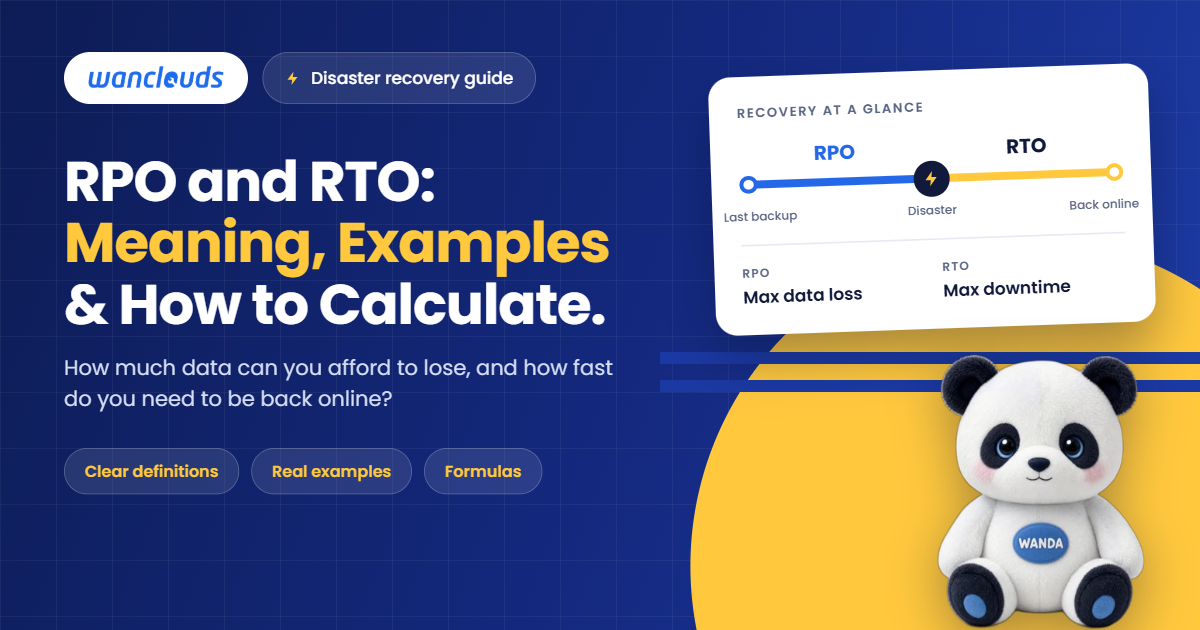
RPO and RTO are the two numbers at the heart of every disaster recovery plan. Recovery Point Objective (RPO) is how much data you can afford to lose, measured in time. Recovery Time Objective (RTO) is how long a system can stay down before the outage seriously hurts the business. Get them right and you know exactly how often to back up, how fast you must fail over, and what your recovery setup should cost.
This guide explains what RPO and RTO mean, how they differ, how to calculate them for each application, and which cloud disaster recovery approach meets which targets.
What Do RPO and RTO Stand For?
- RPO stands for Recovery Point Objective.
- RTO stands for Recovery Time Objective.
Both are recovery objectives: targets your business sets in advance, usually during a business impact analysis, that your disaster recovery and business continuity plans must then meet. They are set per application, not once for the whole company. Your payment system and your intranet wiki should not share the same targets.
What Is RPO (Recovery Point Objective)?
RPO is the maximum amount of data, measured in time, that you can lose after an incident. NIST SP 800-34 defines it as the point in time to which data must be recovered after an outage. In plain terms it answers one question: how much data can we afford to lose?
RPO is set by how often you protect data. If you take a backup every hour, the worst case is losing just under an hour of changes, so your RPO is one hour.
RPO example: an e-commerce store sets a 15-minute RPO for its order database. Backups or replication must capture every change at least every 15 minutes. If the database fails at 10:14, everything up to 10:00 is safe and at most 14 minutes of orders have to be re-entered or recovered from other systems.
- Mission-critical systems (payments, orders, patient records): RPO of seconds to near zero, using continuous replication.
- Business systems (CRM, ERP reporting): RPO of 15 minutes to a few hours.
- Low-priority systems (archives, internal wikis): RPO of 24 hours is often acceptable.
What Is RTO (Recovery Time Objective)?
RTO is the maximum time a system can be offline after an incident before the outage causes unacceptable harm. NIST describes it as the overall length of time a system's components can be in the recovery phase before negatively impacting the organization's mission or business processes. It answers: how quickly must we be back up?
RTO covers the whole recovery, not just restoring data: detecting the problem, deciding to fail over, bringing up infrastructure, restoring data, testing, and reopening the service to users.
RTO example: an online banking platform sets a 15-minute RTO for its login and payments service. The disaster recovery setup must bring that service back within 15 minutes, which in practice means a standby environment that is already running, not one built from backups after the fact.
RPO vs RTO: Key Differences
RPO looks backward from the incident: how much recent data is lost. RTO looks forward: how long until the service runs again. One system can have a short RPO and a long RTO, or the other way round.
- What it measures: RPO measures data loss. RTO measures downtime.
- Direction in time: RPO is the gap before the incident (last good copy to failure). RTO is the gap after it (failure to recovery).
- What drives it: RPO is driven by backup and replication frequency. RTO is driven by failover automation, standby infrastructure and runbooks.
- Cost: a lower RPO mostly costs storage and bandwidth. A lower RTO usually costs more, because it needs infrastructure that is ready to run at all times.
- How you prove it: RPO is checked by inspecting backup and replication timestamps. RTO can only be proven by a timed recovery test.
RPO, RTO, MTD and SLA: How They Fit Together
Two related terms often appear next to RPO and RTO:
- Maximum Tolerable Downtime (MTD) is the total outage the business can survive before the damage is severe. RTO must be shorter than MTD, leaving time to verify systems and catch up on work once they are back.
- Service Level Agreement (SLA) is what you promise customers, for example 99.9% uptime. Your RTO and RPO must be tight enough that a disaster does not break the SLA.
A simple rule: RTO + time to verify and catch up ≤ MTD, and every RTO and RPO should support the SLAs you have signed.
How to Calculate RPO and RTO
There is no universal formula. Both numbers come from the business, then the technology has to meet them. Work through these steps for each application:
- List your applications and their dependencies. Include databases, identity, DNS and network services. An app cannot recover faster than the services it relies on.
- Run a business impact analysis. For each application, estimate what an hour of downtime costs in lost revenue, penalties, productivity and reputation, and what losing an hour of data would cost to recreate or would mean for compliance.
- Set the RPO. Pick the largest data loss the business can accept. If losing 30 minutes of orders is tolerable but an hour is not, the RPO is 30 minutes.
- Set the RTO. Pick the longest downtime that stays below the MTD and does not breach customer SLAs.
- Group applications into tiers. For example Tier 1 (RPO and RTO near zero to 15 minutes), Tier 2 (1 to 4 hours), Tier 3 (24 hours). Tiers keep the plan manageable and the costs predictable.
- Choose a DR strategy that meets each tier, using the strategies in the next section.
- Test and measure. Your real RPO is the age of the newest copy you can actually restore. Your real RTO is the time a recovery drill actually takes. If the measured numbers miss the targets, change the setup or renegotiate the targets.
Quick calculation example: a CRM is backed up every 4 hours, and a full restore takes 3 hours. Its achievable RPO is 4 hours and its achievable RTO is at least 3 hours, plus detection and decision time. If the business needs a 1-hour RPO, backups must run at least hourly or switch to replication.
RPO and RTO for Each Cloud Disaster Recovery Strategy
Cloud providers usually describe four disaster recovery strategies, from cheapest and slowest to most expensive and fastest. AWS uses this model in its Well-Architected Reliability guidance, and the same pattern applies on IBM Cloud, Azure and Google Cloud.
- Backup and restore: data is backed up to another region or cloud, and infrastructure is rebuilt only after a disaster. Typical RPO and RTO: hours. Lowest cost. Fits Tier 3 systems.
- Pilot light: data is replicated continuously and core infrastructure, such as databases, runs in the recovery site, but application servers are off until needed. Typical RPO: minutes. Typical RTO: tens of minutes.
- Warm standby: a scaled-down but fully working copy of the environment runs at all times and is scaled up during failover. RPO: seconds to minutes. RTO: minutes.
- Multi-site active/active: the workload runs in two or more sites at once. RPO and RTO close to zero. Highest cost. Reserve it for systems where every minute of downtime is very expensive.
For containerized workloads, see our guide on achieving zero RPO for disaster recovery on Kubernetes.
Why RPO and RTO Matter
Without defined RPO and RTO targets, recovery is guesswork. Teams discover during the outage that backups are too old, restores are too slow, or nobody knows which system comes back first. Clear targets help you:
- Limit financial damage. IBM's Cost of a Data Breach Report 2025 puts the global average cost of a breach at $4.44 million, and lost business is one of its largest components. Faster recovery directly shrinks that number.
- Spend where it matters. Near-zero targets for every system are unaffordable. Tiered targets put the budget on the applications that earn the revenue.
- Meet compliance requirements. Frameworks and regulations such as ISO 22301, SOC 2, HIPAA and the EU's DORA expect documented, tested recovery objectives.
- Recover from ransomware. A short RPO only helps if the recovery point is clean. Immutable or isolated backups make sure the copy you restore has not been encrypted too.
Best Practices for Setting and Meeting RPO and RTO
- Set targets per application, by business impact. Let the business impact analysis decide, not the current backup schedule.
- Map dependencies first. Identity, DNS and shared databases often decide the real RTO of everything that depends on them.
- Automate backups and failover. Manual steps are the most common reason RTOs are missed. Use cloud-native, policy-based tools that run on schedule and fail over with one action.
- Keep copies in another region or cloud. A backup in the same region or account as production can fail with it.
- Protect backups from ransomware. Use immutable storage, separate credentials and anomaly detection so a clean recovery point always exists.
- Test your disaster recovery plan regularly. Time every drill and compare the results to your RPO and RTO. Untested targets are assumptions.
- Document and review. Record the targets, owners and runbooks, and review them whenever applications, data volumes or regulations change.
Common Challenges in Meeting RPO and RTO
- Budget pressure: tight targets need standby capacity and replication, which add cost. Tiering is the fix.
- Inconsistent backup schedules across teams and clouds, which leave some systems with a much older recovery point than planned.
- Compatibility problems during failover, such as mismatched instance types, network settings or images in the recovery site.
- Data corruption or ransomware spreading to replicas, so the latest copy cannot be used.
- Multi-cloud complexity: different backup tools and consoles for each cloud make consistent targets hard to enforce and report on.
How Wanclouds Helps You Meet Your RPO and RTO
Wanclouds Disaster Recovery as a Service (DRaaS), powered by WANDA, our agentic AI platform for cloud operations, helps teams set and meet recovery objectives across IBM Cloud, AWS, Azure, Google Cloud and on-premises environments from one place. With WANDA you can:
- Create custom backup schedules for each workload to match its RPO.
- Automate restoration and cross-cloud recovery to shorten RTO.
- Detect ransomware events so you recover from a clean point.
- Manage and report on all workloads from a single dashboard.
Conclusion
RPO tells you how much data you can lose, and RTO tells you how long you can be down. Set both per application from a business impact analysis, choose the backup or failover strategy that meets each target, and prove the numbers with regular, timed tests. That is the difference between a disaster recovery plan on paper and one that works. For the wider picture, read our guide to building an effective cloud disaster recovery plan.
Need help working out the right RPO and RTO for your workloads? Contact Wanclouds for a complimentary disaster recovery assessment.
Reference: NIST SP 800-34 Rev. 1, Contingency Planning Guide for Federal Information Systems, which defines RPO, RTO and MTD.